The following steps are required in order to gain access to the Projektportal's API.
1. Find the initial information
a) Log in to the Projektportalen application.
b) Go to Settings/Integrations/Others/Edi order. These settings will be needed later on.
If no credentials have been created, click the [+] button to generate new ones, activate them, and save the credentials.

2. Retreive the authorization code
In this step you will get the AUTHORIZATION_CODE. Which is the public identifier for the app.
a) In the following URL, replace CLIENT_ID text with the appropriate value from the step 1.https://api.projektportalen.se/api/authorize?client_id=CLIENT_ID&redirect_uri=https://projectportal.developer.azure-api.net/authcodeview
b) Open the browser and enter the URL you just modified above. Then you will be redirected to the API authorization form.
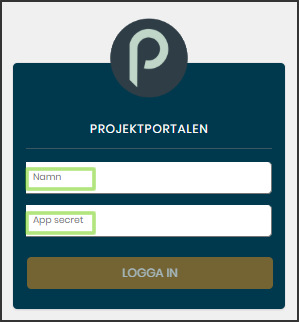
c) Log in using the information from the EdiOrder (See step 1)
Name = Name from the EdiOrder
App secret = Client Secret from the EdiOrder
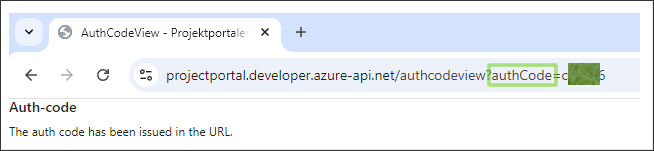
After clicking the Login button you will see the following page. At the end of the URL, locate the value after authCode.
That value is the AUTHORIZATION_CODE, copy and save that value for later use and close the browser.
3. Create the authorization encoded value
In this step you will create the AUTHORIZATION_ENCODED_VALUE.
a) Concatenate the following 3 values into a single string. (See step 1)
1 ) The ClientId from the EdiOrder
2 ) :
3 ) The Client_Secret from the EdiOrder
b) Once concatenated, encode the resulting string as base64.
This value is the AUTHORIZATION_ENCODED_VALUE.
4. Retrieve the access and refresh tokens
In this step you will get the ACCESS_TOKEN and the REFRESH_TOKEN.
Using for example POSTMAN, make a POST call to the URL https://api.projektportalen.se/api/get-token using the following 2 headers.
Replace AUTHORIZATION_CODE text with the appropriate value (See step 2)
1 ) auth-code= AUTHORIZATION_CODE
Replace AUTHORIZATION_ENCODED_VALUE text with the appropriate value (See step 3)
2 ) Authorization= Basic AUTHORIZATION_ENCODED_VALUE
The response will be a JSON object like the example bellow.

✅ Ensure you save these values for later use.
Remember, you will require the latest refresh token to request a new set of access and refresh tokens when the current ones expire after one hour. (See step 7)
5. Retrieve the API primary key
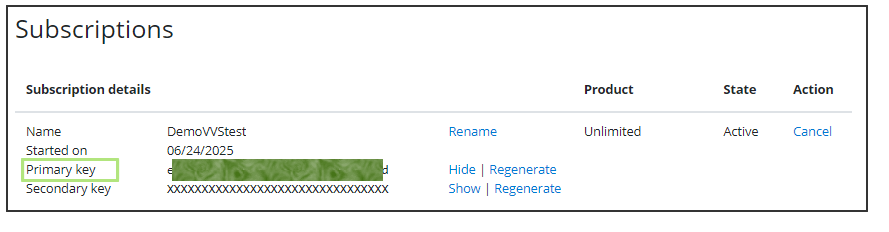
In this step you will get the API_PRIMARY_KEY
a) Go to https://projectportal.developer.azure-api.net and login
b) Go to the Profile tab
c) Under subscriptions, click on Show to see the value of the primary Key. Copy and save that value for later use.
6. Make your first call
In this step you will get the current UTC date and time from Projetportalen's API. Doing so, means that you have access to the projektportalen's API.
Make a GET call to the URL https://connect.projektportalen.se/masterdata/current-datetime using the following 3 headers.
Replace ACCESS_TOKEN text with the appropriate value (See step 4)
1 ) Authorization= Bearer ACCESS_TOKEN
2 ) Ocp-Apim-Trace= true
Replace API_PRIMARY_KEY text with the appropriate value (See step 5)
3 ) Ocp-Apim-Subscription-Key= API_PRIMARY_KEY
The response should be the current UTC date and time, for example:

7. Retrieve new access and refresh tokens
In this step you will get new ACCESS_TOKEN and REFRESH_TOKEN.
Make a POST call to the URL https://api.projektportalen.se/api/refresh-token using the following 2 headers.
Replace REFRESH-TOKEN text with the latest refresh token from your records (See step 4)
1 ) refresh-token= REFRESH-TOKEN
Replace AUTHORIZATION_ENCODED_VALUE text with the appropriate value (See step 3)
2 ) Authorization= Basic AUTHORIZATION_ENCODED_VALUE
The response will be a JSON object like the example bellow. Copy and save those values for later use.

In summary, these were the 7 steps you need to follow to communicate effectively with the API.
Code snippets
The following 3 C# examples demonstrate how the user can interact with the API to GET or POST data directly from code.
1 ) Code related to the STEP 4 (Retrieve the access and refresh tokens)
------------------------------------------------ Code begin for step 4 ------------------------------------------------
public async Task<Token> GetAccessAndRefreshTokens()
{
var clientId = USE_YOUR_CLIENT_ID_HERE;
var clientSecret = USE_YOUR_CLIENT_SECRET_HERE;
var authCode = USE_YOUR_AUTH_CODE_HERE;
var tokenUrl = "https://api.projektportalen.se/api/get-token";
Token? token = new Token
{
AccessToken = string.Empty,
RefreshToken = string.Empty
};
if (authCode == null || string.IsNullOrEmpty(authCode)) throw new Exception("authCode shouldn't be null.");
using (var client = new HttpClient())
{
var credentials = Convert.ToBase64String(Encoding.ASCII.GetBytes(clientId + ":" + clientSecret));
client.DefaultRequestHeaders.Add("Authorization", $"Basic {credentials}");
client.DefaultRequestHeaders.Add("auth-code", authCode);
try
{
HttpContent? emptyContent = null;
var result = await client.PostAsync(tokenUrl, emptyContent);
var content = await result.Content.ReadAsStringAsync();
token = JsonConvert.DeserializeObject<Token>(content);
}
catch (Exception e)
{
var exceptionMessage = e.Message;
}
}
return token; // Save these tokens for future calls to the API
}
//This class is used inside the method above
public class Token
{
public string? AccessToken { get; set; }
public string? RefreshToken { get; set; }
}
------------------------------------------------ Code end for step 4 ------------------------------------------------
2 ) Code related to the STEP 6 (Make your first call)
------------------------------------------------ Code begin for step 6 ------------------------------------------------
public async Task<string> MakeYourFirstCall()
{
var toReturn = string.Empty;
var clientId = USE_YOUR_CLIENT_ID_HERE;
var clientSecret = USE_YOUR_CLIENT_SECRET_HERE;
var azureOcpApimSubscriptionKey = USE_YOUR_KEY_HERE;
var azureOcpApimTrace = "true";
Token token = new Token
{
AccessToken = USE_YOUR_ACCESS_TOKEN_HERE,
RefreshToken = string.Empty
};
var bussinessAzureBaseUrl = "https://connect.projektportalen.se/masterdata/";
var action = "current-datetime"; // This was chossen for this demonstration .
var endpoint = bussinessAzureBaseUrl + action;
if (token == null || string.IsNullOrEmpty(token.AccessToken)) throw new Exception("AccessToken shouldn't be null or empty.");
using (var client = new HttpClient())
{
var credentials = Convert.ToBase64String(Encoding.ASCII.GetBytes(clientId + ":" + clientSecret));
client.DefaultRequestHeaders.Add("Authorization", $"Bearer {token.AccessToken}");
client.DefaultRequestHeaders.Add("Ocp-Apim-Trace", azureOcpApimTrace);
client.DefaultRequestHeaders.Add("Ocp-Apim-Subscription-Key", azureOcpApimSubscriptionKey);
try
{
var result = await client.GetAsync(endpoint);
var content = await result.Content.ReadAsStringAsync();
var simpleString = JsonConvert.DeserializeObject<string>(content);
toReturn = simpleString;
}
catch (Exception e)
{
var exceptionMessage = e.Message;
}
}
return toReturn;
}
//This class is used inside the method above
public class Token
{
public string? AccessToken { get; set; }
public string? RefreshToken { get; set; }
}
------------------------------------------------ Code end for step 6 ------------------------------------------------
3 ) Code related to the STEP 7 (Retrieve new access and refresh tokens)
------------------------------------------------ Code begin for step 7 ------------------------------------------------
public async Task<Token> GetNewAccessAndRefreshTokens()
{
var clientId = USE_YOUR_CLIENT_ID_HERE;
var clientSecret = USE_YOUR_CLIENT_SECRET_HERE;
var refreshTokenUrl = "https://api.projektportalen.se/api/refresh-token";
Token token = new Token
{
AccessToken = string.Empty,
RefreshToken = USE_YOUR_REFRESH_TOKEN_HERE
};
if (token == null || string.IsNullOrEmpty(token.RefreshToken)) throw new Exception("RefreshToken shouldn't be null or empty.");
using (var client = new HttpClient())
{
var credentials = Convert.ToBase64String(Encoding.ASCII.GetBytes(clientId + ":" + clientSecret));
client.DefaultRequestHeaders.Add("Authorization", $"Basic {credentials}");
client.DefaultRequestHeaders.Add("refresh-token", token.RefreshToken);
try
{
HttpContent? emptyContent = null;
var result = await client.PostAsync(refreshTokenUrl, emptyContent);
var content = await result.Content.ReadAsStringAsync();
var newToken = JsonConvert.DeserializeObject<Token>(content);
token = newToken;
}
catch (Exception e)
{
var exceptionMessage = e.Message;
}
}
return token; // Save these tokens for future calls to the API
}
//This class is used inside the method above
public class Token
{
public string? AccessToken { get; set; }
public string? RefreshToken { get; set; }
}
------------------------------------------------ Code end for step 7 ------------------------------------------------